Serving real-time decoded data
Output in the terminal
- The
--verboseoption dumps JSON entries to the terminal as messages are received. - The
--interactiveoption is similar to thedump1090 --interactiveand provides a table view of the visible aircraft. For example the following snapshot can be obtained with a locally connected dongle withjet1090 --interactive rtlsdr://
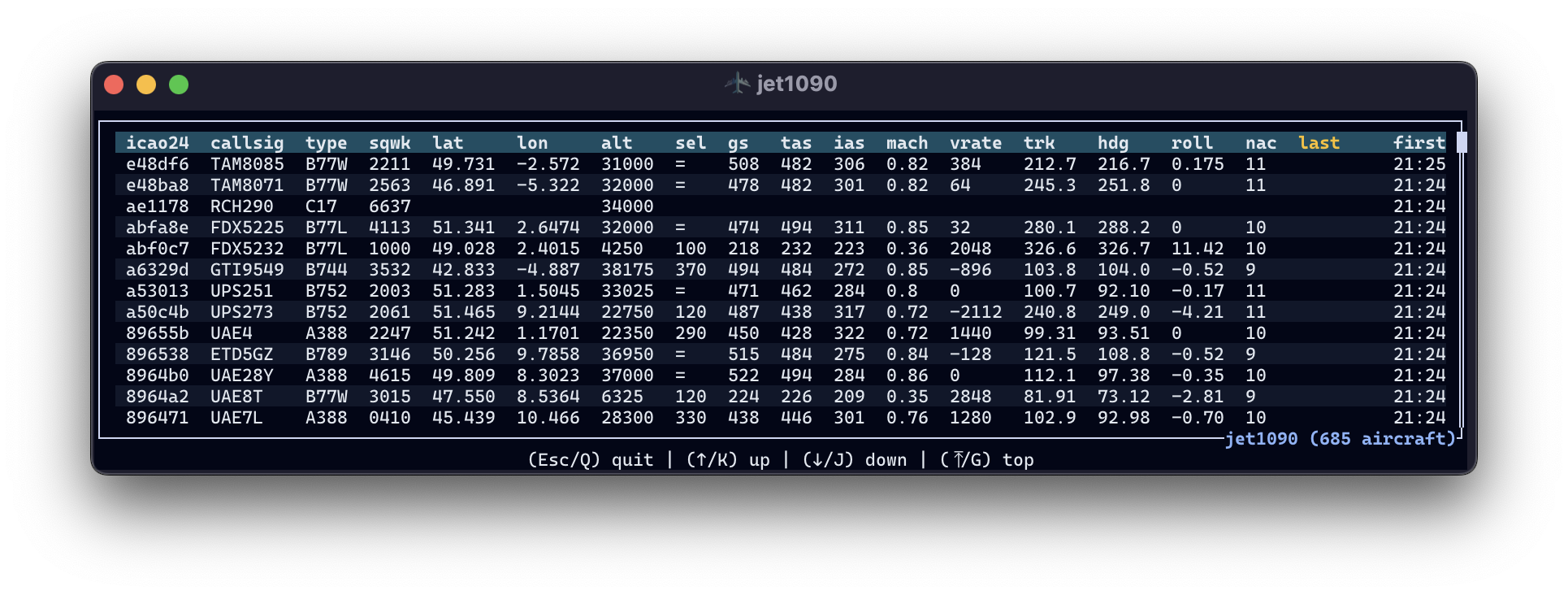
Both options are incompatible and --interactive has the priority.
In the table view, aircraft can be sorted by:
| key | |
|---|---|
. |
number of messages (count), default |
A |
altitude |
C |
callsign |
F |
first timestamp |
L |
last timestamp |
V |
vertical rate |
- |
ascending/descending order |
Output as a JSON file
The -o or --output option enables the dumping of decoded messages to a file in the JSON line format.
If the filename ends in .jsonl.zst, output is automatically compressed with
Zstandard. All other filenames keep the existing uncompressed behavior.
jet1090 --output capture.jsonl.zst tcp://127.0.0.1:30005
decode1090 follow capture.jsonl.zst
The compressor and file buffers are flushed approximately every second, even
when no new messages arrive, so the file can be followed while it is still
being written. decode1090 follow reads from the first byte, displaying
existing records before following additions without re-decoding their frames.
It accepts plain JSONL too and stops with Ctrl-C. The file must already exist;
rotation/replacement and truncation are not supported.
A plain tail -f cannot start arbitrarily inside a compressed frame. The
tail -c +1 -f file.jsonl.zst | zstd -dc pipeline reads from the beginning but
can lag at low traffic rates because the zstd CLI buffers piped input.
decode1090 follow instead reads incrementally and flushes decoded output
immediately. Further downstream pipes may still add their own buffering.
jet1090 retains its append behavior: restarting with the same output filename
adds another Zstandard frame. The zstd CLI and decode1090 file accept these
concatenated frames. Graceful shutdown (including SIGINT/SIGTERM in headless
mode) finalizes the current frame. Forced termination such as SIGKILL or power
loss may leave an unfinished final frame. decode1090 also supports automatic
.jsonl.zst output, but overwrites its output file as before rather than appending.
That format is easily accessible from several libraries across programming languages:
import pandas as pd

df = pd.read_json("output.jsonl", lines=True)
import polars as pl

df = pl.read_ndjson("output.jsonl")
You will need the lazy and ndjson (new line delimited JSON) features:
[dependencies]
polars = { version = "0.34", features = ["lazy", "ndjson"] }
use polars::prelude::*;

let df = LazyFrame::scan_ndjson("output.jsonl", ScanArgsNdJson::default())?
    .collect()?;
data = fetch("output.jsonl")
  .then(response => response.text())
  .then(text => text.split("\n").filter(line => line.trim() !== "").map(JSON.parse));
library(ndjson)

df <- ndjson::stream_in("output.jsonl")
REST API
If a --serve-port option is set, a REST API is set on 0.0.0.0 on the port of your choice.
The following endpoint are provided:
/: returns an index page with the available routes/icao24: returns a list of all visibleicao24identifiers/all: returns a list of all state vectors (the last valid field for each aircraft)/track?icao24=xxx: returns a list of all received messages for a given aircraft./sensors: returns information about all sensors/airports?q=xxx: returns a list of airports matching the query string/stream: a live feed of decoded messages as server-sent events (see below)
Warning
By default, all the history remains accessible until the program exits but this behaviour can drain your RAM memory quickly if you see many aircraft. You can use the --history-expire parameter to limit the history to a number of minutes before the current time.
You can also completely deactivate the storing of messages with the --history-expire 0 option.
Live stream
The /stream endpoint pushes every decoded message as it arrives, in the same JSON format as the .jsonl output and the Redis feed. It uses server-sent events, so any browser can consume it without extra libraries:
const source = new EventSource("http://localhost:8080/stream");
source.onmessage = (event) => console.log(JSON.parse(event.data));
The --df-filter and --aircraft-filter options apply before the stream, so a message excluded there never reaches any subscriber.
A client that reads too slowly is moved to the live edge of the feed and misses the messages in between. The decoder never waits for a client.
WebSocket
(not yet supported)
Redis pub/sub
If the --redis-url is set, all messages are sent to the Redis pub/sub instance.
The default topic is jet1090 but it can be overriden with the --redis-topic option.
You may run a Redis server as a Docker or podman instance:
docker run -d --rm --name redis -p 6379:6379 -p 8001:8001 redis/redis-stack:latest
podman run -d --rm --name redis -p 6379:6379 -p 8001:8001 redis/redis-stack:latest
You may check messages are incoming through the web interface on http://localhost:8001 or with a redis CLI client, for instance:
$ uvx iredis
Installed 11 packages in 51ms
iredis  1.15.0 (Python 3.13.1)
redis-server  7.4.1
Home:   https://iredis.xbin.io/
Issues: https://github.com/laixintao/iredis/issues
127.0.0.1:6379> psubscribe jet1090
# messages should be incoming here